About the worksheet font
See the Andika letterforms and understand the difference between light tracing and outlines.
All worksheets use Andika Regular. The preview and downloaded files use the same letter shapes, so you can check the sample before printing a pack.
Look at the print-letter shapes
Andika was designed for literacy use. It provides the print-letter models on these sheets. Compare forms such as a, g and lowercase l with the handwriting model used in your lesson.
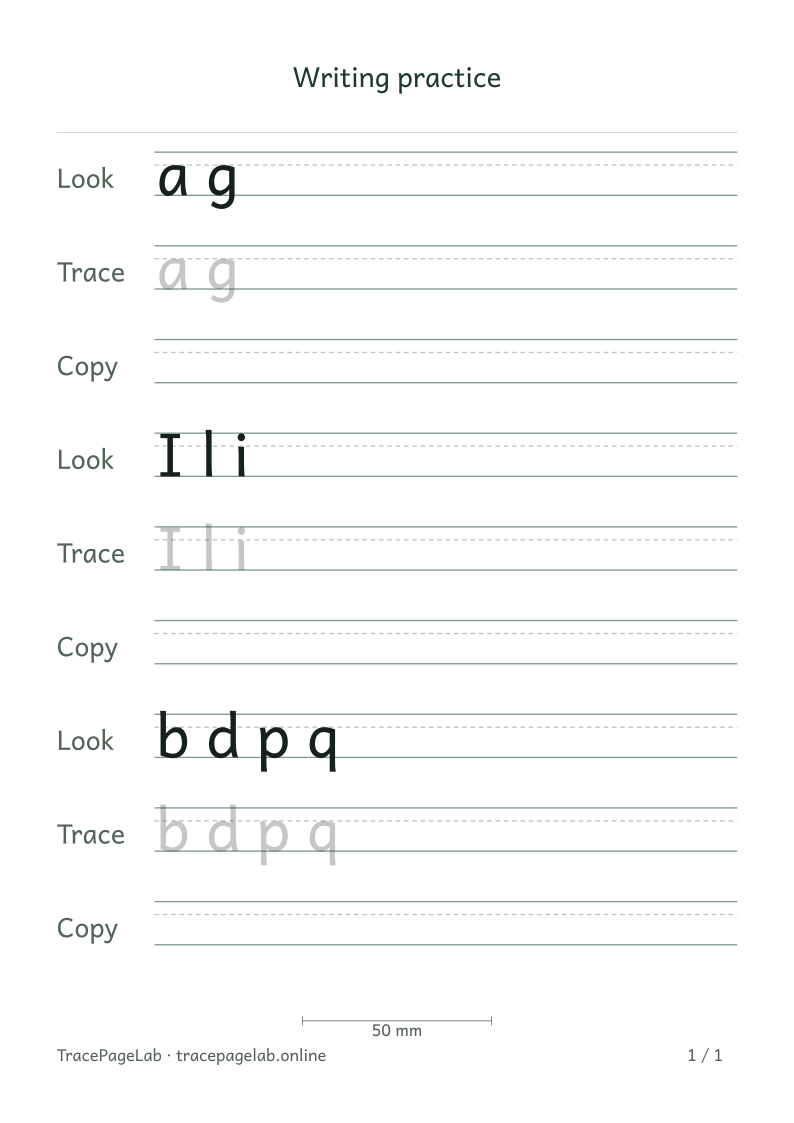
Look at a, g, I and l before printing. Their shapes may differ from the model used in your lesson.
Style and tracing treatment are different
| Choice | What it changes |
|---|---|
| Andika Regular | The letter shapes and their proportions |
| Solid model | Solid lettering |
| Light-gray trace | Pale lettering |
| Outline | The edges of the printed letters |
| Blank copy row | Guidelines with no lettering |
Hollow outlines follow the edges of each printed letter. They are different from dotted centerlines or instructions for moving a pencil. The worksheets do not show stroke-order arrows or starting dots.
Why the font version travels with a project
A font update can change letter spacing or height. Saved projects record the font version so the editor can detect a mismatch. If you see a compatibility message, keep the original file and use the matching release.
Check suitability before making a pack
If you need cursive, joined writing or a particular school’s letterforms, use materials that match that model. Changing between solid, pale and outline text changes the tracing treatment, not the underlying font.